
There are two scenario’s where user might to delete duplicate records.
Scenario 1: Complete row is duplicate including ID column:
CREATE TABLE basket(
    id SERIAL,
    fruit VARCHAR(50) NOT NULL
);

INSERT INTO basket(id,fruit) values(1,'apple');
INSERT INTO basket(id,fruit) values(1,'apple');
INSERT INTO basket(id,fruit) values(2,'banana');
INSERT INTO basket(id,fruit) values(3,'banana');
INSERT INTO basket(id,fruit) values(4,'orange');
INSERT INTO basket(id,fruit) values(4,'orange');
INSERT INTO basket(id,fruit) values(5,'orange');
PostgreSQL tables has an hidden key for every records, and that is CTID.
The CTID field is a field that exists in every PostgreSQL table and is unique for each record in a table and denotes the location of the tuple.
select *, ctid from basket

To delete duplicate records from a table where all the column matches, even the id column, we can use CTID column which we know is unique for each record.
WITH x AS
(
         SELECT   id ,
                  Min(ctid) AS min
         FROM     basket
         GROUP BY id
         HAVING   Count(id) > 1 )
DELETE
FROM   basket b
using  x
WHERE  x.id = b.id
AND    x.min <> b.ctid
returning *;
Here, returning * means the query returns the records which are deleted. We can omit that if not required.
Scenario 2: Complete row is duplicate except the id column:
CREATE TABLE basket(
    id SERIAL PRIMARY KEY,
    fruit VARCHAR(50) NOT NULL
);

INSERT INTO basket(fruit) values('apple');
INSERT INTO basket(fruit) values('apple');

INSERT INTO basket(fruit) values('orange');
INSERT INTO basket(fruit) values('orange');
INSERT INTO basket(fruit) values('orange');

INSERT INTO basket(fruit) values('banana');
As you can see, we have some duplicate rows such as 2 apples and 3 oranges in the basket table.
If the table has few rows, you can see which ones are duplicate immediately. However, it is not the case with the big table.
The find the duplicate rows, you use the following statement:
SELECT
    fruit,
    COUNT( fruit )
FROM
    basket
GROUP BY
    fruit
HAVING
    COUNT( fruit )> 1

– Deleting duplicate rows using DELETE USING statement
DELETE
FROM
    basket a
        USING basket b
WHERE
    a.id < b.id
    AND a.fruit = b.fruit;
In this example, we joined the basket table to itself and checked if two different rows (a.id < b.id) have the same value in the fruit column.
The above query removed the duplicate rows with lowest ids and keep the one with the highest id.
If you want to keep the duplicate rows with the lowest id, you use just need to flip the operator in the WHERE clause: a.id > b.id
– Deleting duplicate rows using SubQuery
DELETE FROM basket
WHERE  id NOT IN (SELECT Min(id)
                  FROM   basket
                  GROUP  BY fruit)
– Deleting duplicate rows using row_number() and Partition Over
SELECT id, fruit,
         ROW_NUMBER() OVER( PARTITION BY fruit
        ORDER BY  id) as row_num from basket
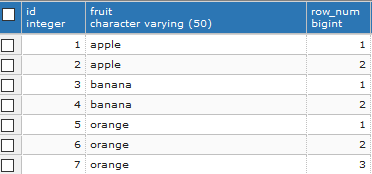
Now, we can delete the rows where row_num is greater than 1, leaving behind only unique records.
DELETE FROM basket
WHERE id IN
    (SELECT id
    FROM
        (SELECT id,
         ROW_NUMBER() OVER( PARTITION BY fruit
        ORDER BY  id ) AS row_num
        FROM basket ) t
        WHERE t.row_num > 1 );
In case you want to delete duplicate based on values of multiple columns, here is the query template:
DELETE FROM table_name
WHERE id IN
    (SELECT id
    FROM
        (SELECT id,
         ROW_NUMBER() OVER( PARTITION BY column_1,
         column_2
        ORDER BY  id ) AS row_num
        FROM table_name ) t
        WHERE t.row_num > 1 );
In this case, the statement will delete all rows with duplicate values in the column_1 and column_2columns.
– Deleting duplicate rows using an immediate table:
To delete rows using an immediate table, you use the following steps:
- Create a new table with the same structure as the one whose duplicate rows should be removed.
- Insert distinct rows from the source table to the immediate table.
- Drop the source table.
- Rename the immediate table to the name of the source table.

 Harshit Jain