
Querying hierarchy data example:
CREATE TABLE employee (
   employee_id INT PRIMARY KEY,
   first_name VARCHAR (255) NOT NULL,
   last_name VARCHAR (255) NOT NULL,
   manager_id INT,
   FOREIGN KEY (manager_id)
   REFERENCES employee (employee_id)
   ON DELETE CASCADE
);
INSERT INTO employee (
   employee_id,
   first_name,
   last_name,
   manager_id
)
VALUES
   (1, 'Windy', 'Hays', NULL),
   (2, 'Ava', 'Christensen', 1),
   (3, 'Hassan', 'Conner', 1),
   (4, 'Anna', 'Reeves', 2),
   (5, 'Sau', 'Norman', 2),
   (6, 'Kelsie', 'Hays', 3),
   (7, 'Tory', 'Goff', 3),
   (8, 'Salley', 'Lester', 3);
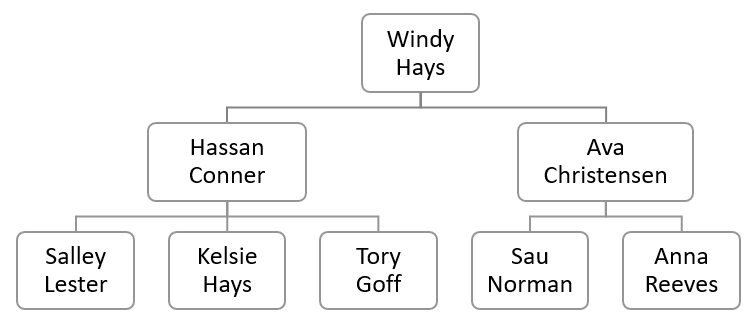
The value in the manager_id column represents the manager who the employee reports to. If the value in the manager_id column is null, then the employee does not report to anyone. In other words, that employee is the top manager.
To find who reports to whom, you use the following query:
SELECT
    e.first_name || ' ' || e.last_name employee,
    m .first_name || ' ' || m .last_name manager
FROM
    employee e
INNER JOIN
    employee m
ON m .employee_id = e.manager_id;
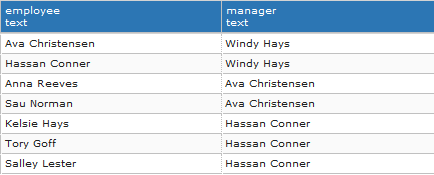
As you can see from the screenshot, the top manager did not appear on the output.
To include the top manager in the result set, you use the LEFT JOIN instead of INNER JOIN clause as shown in the following query:
SELECT
    e.first_name || ' ' || e.last_name employee,
    m .first_name || ' ' || m .last_name manager
FROM
    employee e
LEFT JOIN employee m ON m .employee_id = e.manager_id


 Harshit Jain