
How to list all drives in java?
File.listRoots() method gives the list of all drives of your system.
File[] drives = File.listRoots();
if(drives != null && drives.length > 0) {
    for (File drive : drives) {
        System.out.println("Drive Name : "+drive);
    }
}
How To Find Type of A Drive In Java?
To find the type of a drive (Local disk or CD Drive or Floppy Disk), we use getFileSystemView()method of javax.swing.filechooser.FileSystemView.
FileSystemView fsv = FileSystemView.getFileSystemView();
System.out.println("Type Of Drive : "+fsv.getSystemTypeDescription(drive));
How To Find Total Space, Free Space And Usable Space In A Drive In Java?
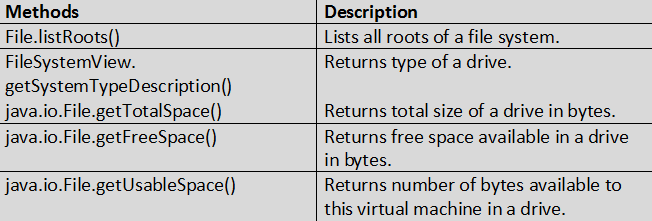
There are three methods introduced in JDK 1.6 related to disk usage. They are getTotalSpace(), getFreeSpace() and getUsableSpace(). All these three methods are members of java.io.File class. Let’s see brief description about these methods.
1) long java.io.File.getTotalSpace() :
This method returns total size of a drive in bytes.
2) long java.io.File.getFreeSpace() :
This method returns free space available in a drive in bytes.
3) long java.io.File.getUsableSpace() :
This method free space available in a drive to the current user.
long totalSpace = drive.getTotalSpace();

long freeSpace = drive.getFreeSpace();

long usableSpace = drive.getUsableSpace();
import java.io.File;
import javax.swing.filechooser.FileSystemView;

public class FileHandlingProgram {
	public static void main(String[] args) {
		FileSystemView fsv = FileSystemView.getFileSystemView();

		File[] drives = File.listRoots();

		if (drives.length > 0 && drives != null) {
			for (File drive : drives) {
				System.out.println("====================");

				System.out.println("Drive Name : " + drive);

				System.out.println("Type Of Drive : " + fsv.getSystemTypeDescription(drive));

				System.out.println("Total Space : " + drive.getTotalSpace() / (1024 * 1024 * 1024) + " GB");

				System.out.println("Free Space : " + drive.getFreeSpace() / (1024 * 1024 * 1024) + " GB");

				System.out.println("Usable Space : " + drive.getUsableSpace() / (1024 * 1024 * 1024) + " GB");
			}
		}
	}
}
Output :
====================
Drive Name : C:\
Type Of Drive : Local Disk
Total Space : 68 GB
Free Space : 20 GB
Usable Space : 20 GB
====================
Drive Name : D:\
Type Of Drive : Local Disk
Total Space : 24 GB
Free Space : 2 GB
Usable Space : 2 GB

 Harshit Jain